
Herramientas de usuario
¡Esta es una revisión vieja del documento!
Tabla de Contenidos
Basic Elm
Starting
When starting a project you will launch the next command:
elm init
You can add Elm code to src folder. For example Main.elm:
import Html
main = Html.text "Hello world"
You can see its result with the next command launching the elm file.
elm reactor
After this you can create a public folder and put there the next index.html code file:
<!DOCTYPE html>
<html lang="en">
<head>
    <meta charset="UTF-8">
    <title>MY COOL ELM APP</title>
</head>
<body>
    <div id="hello-world"></div>
    <script src="main.js"></script>
    <script>
        const myDiv = document.getElementById("hello-world");
        const app = Elm.Main.init({ node: myDiv });
    </script>
</body>
</html>
You can compile the elm file with:
elm make src/Main.elm --output public/main.js
Basic
Type annotation
To declare a function (type anotation) that gets a number and returns an string:
checkStatus : Int -> String
If you write “checkStatus” it will return <function> : Int -> String.
It is something like this:
<function: add> : Int      -> Int      -> Int
| function name | type arg1 | type arg2 | type result |
Other ways to define a type:
coordinates : (Float, Float)
coordinates = (53.1201749, 8.5962037)

list : List number
list = [ 1, 2, 3, 4 ]

rect : { width : Int, height : Int }
rect = { width = 10, height = 20 }
Types
Something similar to an enum is this:
type UserStatus = Regular | Visitor
Where UserStatus only can have values Regular or Visitor.
type UserStatus
  = Regular
  | Visitor

type alias User =
  { status : UserStatus
  , name : String
  }

thomas = { status = Regular, name = "Thomas" }
kate95 = { status = Visitor, name = "kate95" }
Other way to the previous code:
type User
  = Regular String
  | Visitor String

thomas = Regular "Thomas"
kate95 = Visitor "kate95"
Lets see:
type User
  = Regular String Int
  | Visitor String
-- A regular user has name and age; a visitor, only name.
Regular
-- <function> : String -> Int -> User
Visitor
-- <function> : String -> User
Regular "Thomas" 44
-- Regular "Thomas" 44 : User
Visitor "kate95"
-- Visitor "kate95" : User
Type Aliases
A type alias is a shorter name for a type. For example, you could create a User alias like this:
type alias User =
  { name : String
  , age : Int
  }

-- WITH ALIAS

isOldEnoughToVote : User -> Bool
isOldEnoughToVote user =
  user.age >= 18


-- WITHOUT ALIAS

isOldEnoughToVote : { name : String, age : Int } -> Bool
isOldEnoughToVote user =
  user.age >= 18
As I understand you could pattern match a type, but not a type alias. We specify the type of functions like update and view with type aliases.
An Elm Program
There are two ways to insert an Elm program in your browser. As Browser.sandbox or Browser.element. The first one does not have external communication and is good to just create an Elm program that does not interlopes with the browser apart from creating html tags, the second one allows to access to REST services, time, random…
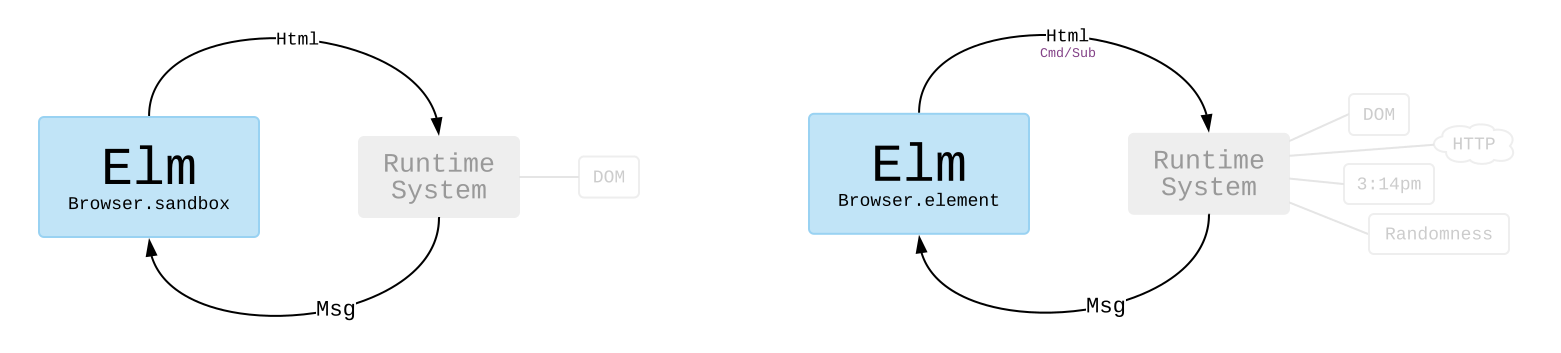
Program structure
The next code is basic program structure. It uses Browser.sandbox to create the end html. Browser.sandbox receives an init value (Which is the model), an update function, and a view function.
module Marcarrones exposing (..)

import Browser
import Html exposing (..)
import Html.Events exposing (onClick)

main = Browser.sandbox { init = 0, update = update, view = view }

-- Where we create a variable Model we are creating an Int
type alias Model = Int

-- Update is a function that receives two ints and returns an int
update : Model -> Int -> Int
-- (Basic implementation) First int parameter is "inccrement", Second int is "model",
-- update increment model = model + increment
-- Adding an "if expression"
update increment model = if increment == 0 then 0 else model + increment

-- This is the standard way of a view function
view : Model -> Html Model
-- View receives a parameter Model called model; it returns an Html and the changed model
view model =
    div []
        [
            -- A button "object" with the onClick method (onClick calls update when the button is pressed)
            button [ onClick 1 ] [ text "Add" ],
            div [] [ text (String.fromInt model) ],
            button [ onClick -1 ] [ text "Subs" ],
            div [] [
                button [ onClick 0 ] [ text "Reset" ]
            ]
        ]
Deprecated
Basic actions
"hello" ++ " world"  -- Concatenate strings
'a' -- Is a character
"a" -- Is a string
1 /= 2  -- True, 1 != 2
c = 1 == 1 -- True
[1, 2, 3] ++ [4, 5, 6] -- Concatenar listas
List.range 1 100 -- Creates a list from 1 to 100
4 :: [1, 2, 3]  -- [4, 1, 2, 3]
String.isEmpty "am I empty"  -- False
String.join ", " (List.sort ["Bob" , "Zack", "Mike"])

answer = 45
if answer < 42 then "Under 42" else "42 or more"
In Elm we do not have to worry about declaring variables, data is immutable and it infires the type.
Functions:
squarer number  = number * number -- <function> : number -> number
squarer 10  -- 100

stringAdd s1 s2 = s1 ++ " " ++ s2
stringAdder = stringAdd "Hey"
strinngAdder "there!"  -- "Hey there"

numAdder n1 n2 = n1 + n2
numAdder2 n1 n2 = n1 + n2
numAdder 10 (numAdder2 5 5)  -- 20

10 \
  |> squarer  -- 10, multiline pass arguments

["Adam", "Molly", "Zeke", "Jane"] \
|> List.sort \
|> String.join ", " -- Adam, Jane, Molly, Zeke

checkTheAnser = anser = |
  if answer > 42 then \
    "Greater than 42" \
  else if answer == 42 then \
    "Answer is 42" \
  else \
    "Under 42" -- <function> number -> String
(True, 42, "Bob")
[(Bool, 100), (True, 200)] -- These tuples have to have the same types inside
Records
bob = { name = "Bob", age = 30 }
bob.name -- Bob
.age bob -- 30 , is like calling a function into bob
bob2 = { bob | age = 31 } -- { name = "Bob", age = 31 }

user1 = {id = 1, name ="bob" }
user2 = {name = "jane" } -- We forgot id

type alias User = {id : Int, name : String }
user1 = User 1 "bob"
user2 = User 2 "jane"

userChecker { id } = \
  if id > 1 then \
    "Greater than 1"
  else \
    "Is the first one"
userChecker user2  -- Greater than 1
Modules (file Hello.elm):
module Hello exposing (..)  -- exposes everything inside the module

import Html exposing (text)  -- we take text from Html

main =
  text "Hello world"
Creating html
module HelloHtml exposing (..)

import Html exposing (text, div, h1)  -- we take text, div, h1 from Html
import Html.Attributes expossing (class)

main : Html msg                               -- specifies the type (avoid warnings)
main =
  div [ class "main-div" ] [                  -- class div with attributes and childs
    h1 [ class "title"] [text "Welcome"]
    , p[] [text "I'm liking this"]
    , p[] [text "lets try"]
  ]
To install packages:
elm install elm-lang/html
To compile a module (we can send –warn):
elm build src/Main.elm
Explicación
To declare a function (type anotation) that gets a number and returns an string:
checkStatus : Int -> String
If you write “checkStatus” it will return <function> : Int -> String.
It is something like this:
<function: add> : Int      -> Int      -> Int
| function name | type arg1 | type arg2 | type result |
Now lets define it:
checkStatus status =
    if status == 200 then
        "You got it, dude!"
    else if status == 404 then
        "Page not found"
    else
        "Unknown response"
Examples
import Html exposing (..)


checkStatus : Int -> String
checkStatus status =
    if status == 200 then
        "You got it, dude!"
    else if status == 404 then
        "Page not found"
    else
        "Unknown response"


statusChecks : List String
statusChecks =
    [ checkStatus 200
    , checkStatus 404
    , checkStatus 418
    ]


renderList : List String -> Html msg
renderList lst =
    lst
        |> List.map createLi
        |> ul []


createLi : String -> Html msg
createLi str =
    li [] [ text str ]


main =
    div []
        [ h1 [] [ text "List of statuses:" ]
        , renderList statusChecks
        ]
Herramientas de la página


